반응형
모바일 어플리케이션을 제작할 때 가로 모드와 세로 모드를 모두 고려하여 제작하면 참 좋겠지만, 어쩔 수 없이 가로모드/세로모드 중 한 가지로 제한해야 하는 경우가 있다.
각 상태의 이름은 다음과 같다.
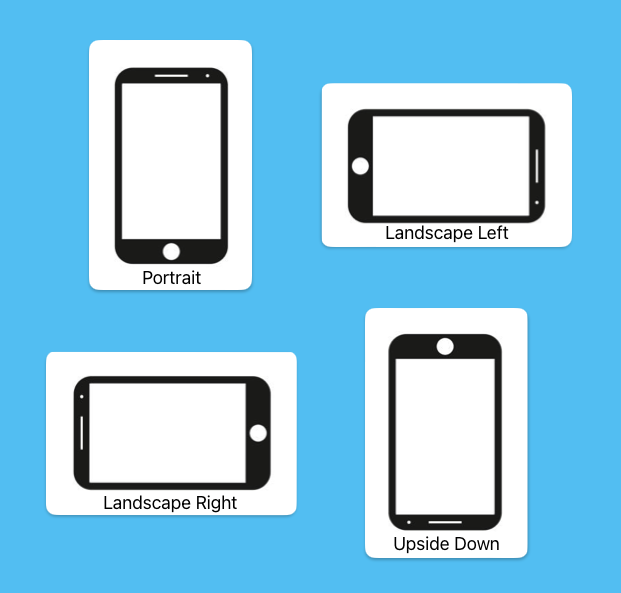
가로모드와 세로모드를 제한/허용하는 것은 모듈을 따로 설치할 필요 없이, 각 OS별로 설정만 해주면 된다.
- Android
android/app/src/main/AndroidMenifest.xml 파일을 열고 다음 위치에 코드를 추가한다.
<manifest xmlns:android="http://schemas.android.com/apk/res/android">
    <uses-permission android:name="android.permission.INTERNET" />
    <application
      android:name=".MainApplication"
      android:usesCleartextTraffic="true"
      android:label="@string/app_name"
      android:icon="@mipmap/ic_launcher"
      android:roundIcon="@mipmap/ic_launcher_round"
      android:allowBackup="true"
      android:theme="@style/AppTheme">
      <activity
        android:name=".MainActivity"
        android:label="@string/app_name"
        // 아래에 코드를 추가한다.
        android:screenOrientation="portrait"
        // 위에 코드를 추가한다.
        android:configChanges="keyboard|keyboardHidden|orientation|screenLayout|screenSize|smallestScreenSize|uiMode"
        android:launchMode="singleTask"
        android:windowSoftInputMode="adjustResize"
        android:exported="true">
        <intent-filter>
            <action android:name="android.intent.action.MAIN" />
            <category android:name="android.intent.category.LAUNCHER" />
        </intent-filter>
      </activity>
    </application>
</manifest>
- iOS
ios/projectName/Info.plist 파일을 열고 다음 위치에 코드를 추가한다.
아마 default로 여러 줄이 있을 텐데 허용하고 싶은 부분만 남기고 삭제한다.
<?xml version="1.0" encoding="UTF-8"?>
<!DOCTYPE plist PUBLIC "-//Apple//DTD PLIST 1.0//EN" "http://www.apple.com/DTDs/PropertyList-1.0.dtd">
<plist version="1.0">
<dict>
	<key>CFBundleDevelopmentRegion</key>
	<string>en</string>
	// ...
	<key>UISupportedInterfaceOrientations</key>
	<array>
    	// 아래에 코드를 추가한다.
		<string>UIInterfaceOrientationPortrait</string>
        // 위에 코드를 추가한다.
	</array>
</dict>
</plist>
반응형
'개발 및 알고리즘 > 개발' 카테고리의 다른 글
| [React Native] Flatlist에 onScrollToIndexFailed 설정하기 (0) | 2024.07.08 |
|---|---|
| [React Native] 리액트 네이티브에서 NetInfo로 인터넷 연결 상태 확인하기 (RN 0.73) (0) | 2024.07.05 |
| [SQL] Trigger: 이벤트를 감지하여 DB에 자동으로 (0) | 2024.06.28 |
| [SQL] Cascade: 참조 무결성을 지키기 위한 방법 (0) | 2024.06.28 |
| [React Native] 리액트 네이티브에서 Lottie 사용하여 애니메이션 넣기 (RN 0.73) (0) | 2024.04.17 |